Min & Max Quantity Limits
Set minimum and maximum purchase quantities per product, variant, or entire cart to control order sizes.
Limit is a minimum order quantity (MOQ) app for Shopify that sets minimum and maximum purchase limits per product, variant, or collection. Rules are enforced at checkout by Shopify Functions, so customers cannot bypass them by editing the cart.
Set wholesale MOQ tiers by customer tag, per-customer lifetime caps, cart-value rules and time-based schedules for flash sales. Free plan available for up to 3 products.


FEATURES
Everything you need to drive conversions, reduce support load, and keep operations stable.
Rules are enforced at checkout via Shopify Functions. Customers cannot bypass quantity limits.
Set min/max limits per product, variant, collection, or entire cart with granular control.
Different rules for wholesale vs retail. Set lifetime purchase caps per customer.
Time-based rules, quantity increments, and cross-product combined limits.
RESULTS
Benchmarks from real merchant outcomes and optimization experiments.
Merchants love the reliability of checkout-level enforcement
Rules enforced via Shopify Functions — cannot be circumvented
Get started with up to 3 products on the free plan
Multi-language support including CJK, European, and more
PRICING
Choose a plan that matches your store size. Upgrade any time.
For growing stores
7-day free trial
Unlimited control
7-day free trial
PROCESS
Set up in minutes. Validate in real-time. Improve results continuously.
Add the app and create your first quantity rule in under 2 minutes. Choose products, variants, or collections and set your min/max limits.
Rules are enforced at checkout using Shopify Functions. Customers see clear error messages and cannot bypass restrictions.
Track rule triggers in the analytics dashboard. Adjust limits based on real data to balance conversions and inventory control.
SUPPORT
Everything you need to set up quickly and get help when you need it.
Set minimum and maximum order quantity rules, MOQ by customer tag, and cart-level limits.
Read the setup guideRules not enforcing at checkout, or limits behaving unexpectedly? Start here.
Troubleshooting guideQuestions about wholesale MOQ tiers or per-customer purchase caps.
Contact supportNeed help choosing the right setup? We'll guide you.


FEATURES
Set minimum and maximum purchase quantities per product, variant, or entire cart to control order sizes.
Limit the total number of items or total cart value across the entire order.
Restrict how many units a single customer can purchase within a time period to prevent hoarding.
Enforce minimum order quantities for wholesale or B2B pricing tiers.
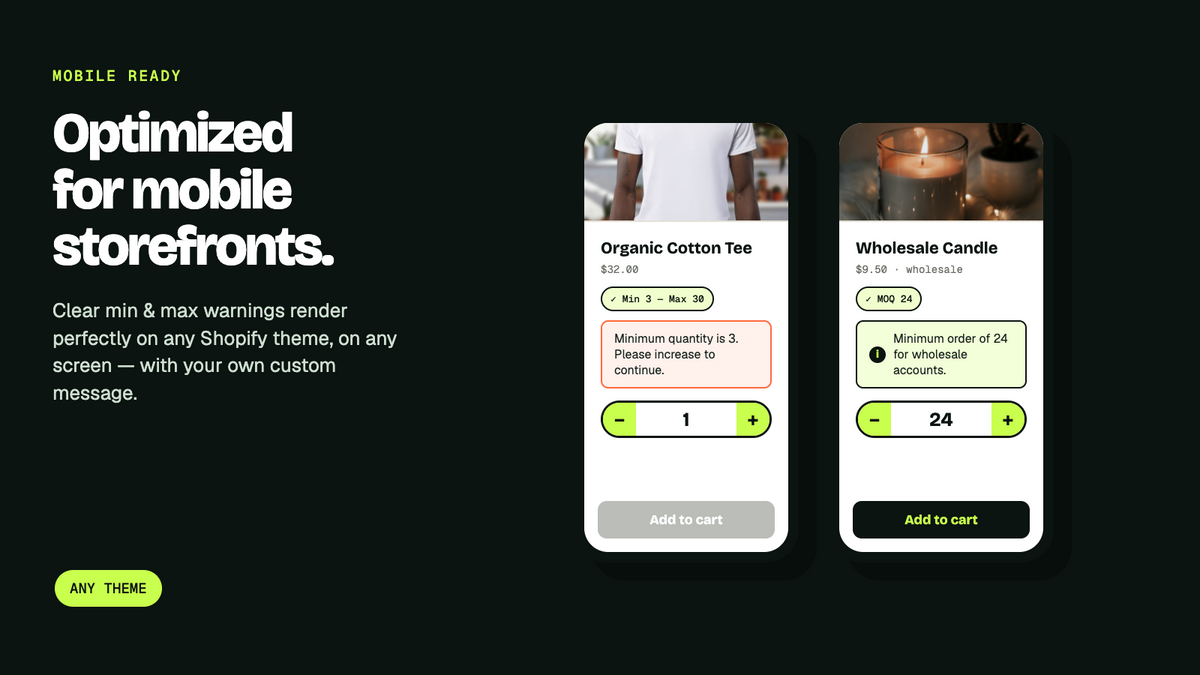
Display branded, helpful error messages when customers exceed limits — fully customizable text and styling.
Set time-based limits for flash sales, pre-orders, or limited drops with automatic start/end dates.
HOW IT WORKS
Add Limit Purchase to your Shopify store. Set global defaults or configure limits per product.
Choose min/max quantities, cart limits, per-customer restrictions, or time-based rules.
Limits are enforced in real-time on your storefront. Customers see clear messages when limits are reached.
IN DEPTH
Why quantity limits break in most stores, and what it takes to make them actually hold.
Most quantity-limit setups fail in the same place: they validate the cart, not the order. A rule that lives in your theme's JavaScript stops a customer who uses the quantity selector. It does not stop the one who edits the cart via a permalink, adds items through a Buy Now button, checks out from a Shop app link, or simply opens the cart in two tabs.
For a store limiting a hyped drop to two units per person, that gap is the entire problem — the people most motivated to bypass the rule are exactly the ones who know how. And you usually find out after the order is placed, when you are choosing between cancelling on a customer or eating the loss.
Limit enforces at the checkout layer using Shopify Functions. The rule runs on Shopify's servers when the order is created, not in the browser, so there is no client-side check to skip.
This distinction is worth understanding before you compare apps, because most listings use the words interchangeably.
You want both: cart validation so customers see a clear message early, and checkout enforcement so the rule actually holds. Limit does both, and the checkout enforcement is included on the free plan rather than gated behind an upgrade.
The most common serious use is the opposite of scarcity — forcing orders up rather than capping them. If your wholesale margin only works above a 12-unit order, a minimum order quantity is what protects it.
Limit applies MOQ rules by customer tag, so your wholesale accounts get a 12-unit minimum while retail customers buy one. Same store, same catalogue, no separate B2B storefront to maintain. You can layer a minimum cart value on top for accounts that mix small items.
Limiting quantity per order is easy. Limiting it per customer — across every order they have ever placed — is what stops resellers, and it is where most apps stop short.
Limit tracks lifetime and time-windowed purchase caps per customer: two per person ever, or three per month. Combined with scheduled rules, that covers the realistic launch scenario — a strict cap during the first 48 hours of a drop that relaxes automatically once the rush passes, without you having to be awake to change it.
Install the app and create a rule in under two minutes: pick the products, variants or collection, set your minimum and maximum, and save. No theme code, no snippet to paste.
Write your own error message so customers see something useful ("Maximum 2 per customer during launch week") instead of a generic rejection. Use the live preview to check how it reads on mobile before publishing. From there the analytics dashboard shows which rules are triggering, so you can tell the difference between a limit protecting inventory and one quietly costing you sales.
Minmaxify has 159 reviews to our 9, and it is a genuinely good app. If review volume is your deciding factor, that comparison does not go our way and we would rather say so.
What we would point out is the free tier. Minmaxify and Extendons both start with a 7-day trial and no free plan, and Extendons puts checkout enforcement behind its $7.99 tier. Limit's free plan covers three products or variants with checkout enforcement included, with no time limit. If you have one product that needs protecting — a drop, a wholesale SKU, a loss leader — you can run that permanently for nothing and never think about it again.
The two apps most often shortlisted alongside Limit. Both are good; they price the free tier differently.
| Feature | Limit (PantherCodX) | Minmaxify Order Limits | Ex MOQ (Extendons) |
|---|---|---|---|
| Free plan | Yes — 3 products/variants, no time limit | No (7-day trial) | No (7-day trial) |
| Checkout enforcement (Shopify Functions) | Included on the free plan | Included, from $10/mo | Spark plan only, $7.99/mo |
| Cost for unlimited products | $9.99/mo | $10/mo | $3.99/mo |
| Per-customer lifetime caps | Yes (Pro) | Not stated on listing | Not stated on listing |
| App Store rating | 4.5 (9 reviews) | 4.9 (159 reviews) | 4.0 (15 reviews) |
Compared from the public Shopify App Store listings in August 2026. Plans change — check each listing before deciding.
GUIDES
Setting purchase limits that hold at checkout, not just in the cart.
FAQ
Yes! Set unique min/max quantity limits per product, per variant, or apply global rules across your entire catalog.
Yes. Limits are enforced directly in the cart and at checkout. Customers cannot proceed if they exceed your rules.
Absolutely. Set per-customer purchase limits with configurable time windows (per day, per week, per order) to prevent bulk buying abuse.
No. The app runs lightweight scripts that check limits in real-time without affecting page load speed.
Yes! The free plan supports minimum and maximum order quantity rules on up to 3 products or variants, with full checkout enforcement. Basic ($4.99/mo) covers up to 10, and Pro ($9.99/mo) is unlimited with wholesale MOQ rules and scheduling.
Yes. Set time-based rules with start and end dates — perfect for limiting quantities during flash sales, product launches, or pre-order windows.
Shopify has no built-in minimum order quantity setting. Install Limit, create a rule, choose the products, variants or collection it applies to, and set your minimum. It takes about two minutes and needs no theme code. The rule is then enforced at checkout, so it cannot be bypassed.
Not with checkout enforcement. Limits that live in theme JavaScript can be skipped via cart permalinks, Buy Now buttons, or the Shop app. Limit runs the check as a Shopify Function when the order is created, on Shopify's servers, so there is no client-side validation to work around.
Yes. Apply MOQ rules by customer tag, so tagged wholesale accounts get a minimum order quantity while retail customers buy single units — same store, same catalogue, no separate B2B storefront needed.
Yes, on the Pro plan. Set lifetime caps (two per customer ever) or time-windowed caps (three per month). This is what actually stops resellers, since per-order limits alone just mean placing several orders.
Yes — Limit's free plan covers up to 3 products or variants with full checkout enforcement and no time limit. Most alternatives offer only a 7-day trial. Paid plans start at $4.99/month for up to 10 products.
No. Enforcement runs as a Shopify Function on Shopify's infrastructure rather than as a script in your theme, so there is nothing added to your page load.
LET'S WORK TOGETHER
Install Limit: Purchase Order Quantity today and see results in minutes. No coding required.
Technologies We Work With
 ReactJs
 Laravel
 HTML
HTML
 CSS
CSS
 JavaScript
 MongoDB
 MySQL
MySQL
 AWS
AWS
 DigitalOcean
ReactJs
Laravel
HTML
CSS
JavaScript
MongoDB
MySQL
AWS
DigitalOcean
DigitalOcean
ReactJs
Laravel
HTML
CSS
JavaScript
MongoDB
MySQL
AWS
DigitalOcean

Alert me if this item is restocked.
We often restock popular items or they may be returned by the other customers. If you would like to be notified when this happens just enter your details below.
We respect your privacy and don't share your email with anybody.
Alert me if this item is restocked
Thank you, we have now received and recorded your request to be notified should Limit: Purchase Order Quantity be restocked.
We will only use your email for this purpose.

Alert me if this item is restocked.
We often restock popular items or they may be returned by the other customers.
Limit: Purchase Order Quantity
Alert me if this item is restocked.
We often restock popular items or they may be returned by the other customers.


